VM-Guy's Virtual Life

As a vmware consultant I run into all kinds of cool things; Here they are for your merriment. Not to be confused with vmguy.com, we are different but both have awesome blogs.

Thursday, January 19, 2017

vSphere 6.5 updates.

vSphere 6.5 is here and has had some time to bake in. Here are some of the improvements and changes VMware made to vSphere 6.5  concerning Host and Resource Management :

(From VMware)

vSphere 6.5 brings a number of enhancements to ESXi host lifecycle management as well as some new capabilities to our venerable resource management features, DRS and HA.  There are also greatly enhanced developer and automation interfaces, which are a major focus in this release.  Last but not least, there are some notable improvements to vRealize Operations, since this product is bundled with certain editions of vSphere.  Let’s dig into each of these areas.

Enhanced vSphere Host Lifecycle Management Capabilities

With vSphere 6.5, administrators will find significantly easier and more powerful capabilities for patching, upgrading, and managing the configuration of VMware ESXi hosts.
VMware Update Manager (VUM) continues to be the preferred approach for keeping ESXi hosts up to date, and with vSphere 6.5 it has been fully integrated with the VCSA.  This eliminates the additional VM, operating system license, and database dependencies of the previous architecture, and now benefits from the resiliency of vCenter HA for redundancy.  VUM is enabled by default and ready to handle patching and upgrading tasks of all magnitudes in your datacenter.
Host Profiles has come a long way since the initial introduction way back in vSphere 4!  This release offers much in the way of both management of the profiles, as well as day-to-day operations.  For starters, an updated graphical editor that is part of the vSphere Web Client now has an easy-to-use search function in addition to a new ability to mark individual configuration elements as favorites for quick access.
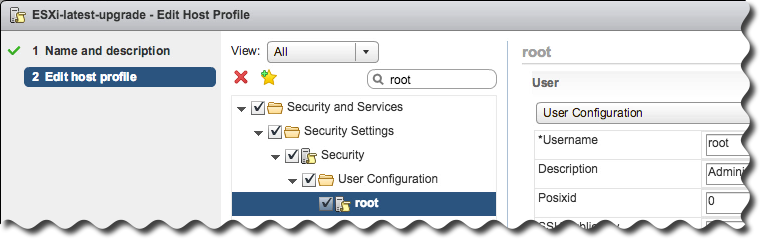
vsphere65-host-profile-editorAdministrators now have the means to create a hierarchy of host profiles by taking advantage of the new ability to copy settings from one profile to one or many others.
Although Host Profiles provides a means of abstracting management away from individual hosts in favor of clusters, each host may still have distinct characteristics, such as a static IP address, that must be accommodated.  The process of setting these per-host values is known as host customization, and with this release it is now possible to manage these settings for groups of hosts via CSV file – undoubtedly appealing to customers with larger environments.
Compliance checks are more informative as well, with a detailed side-by-side comparison of values from a profile versus the actual values on a host.  And finally, the process of effecting configuration change is greatly enhanced in vSphere 6.5 thanks to DRS integration for scenarios that require maintenance mode, and speedy parallel remediation for changes that do not.
Auto Deploy – the boot-from-network deployment option for vSphere – is now easier to manage in vSphere 6.5 with the introduction of a full-featured graphical interface.  Administrators no longer need to use PowerCLI to create and manage deploy rules or custom ESXi images.
ad-gui-tab-animation
New and unassigned hosts that boot from Auto Deploy will now be collected under the Discovered Hosts tab as they wait patiently for instructions, and a new interactive workflow enables provisioning without ever creating a deploy rule.
Custom integrations and other special configuration tasks are now possible with the Script Bundle feature, enabling arbitrary scripts to be run on the ESXi hosts after they boot via Auto Deploy.
Scalability has been greatly improved over previous releases and it’s easy to design an architecture with optional reverse proxy caches for very large environments needing to optimize and reduce resource utilization on the VCSA.  And like VUM, Auto Deploy also benefits from native vCenter HA for quick failover in the event of an outage.
In addition to all of that, we are pleased to announce that Auto Deploy now supports UEFI hardware for those customers running the newest servers from VMware OEM partners.
It’s easy to see how vSphere 6.5 makes management of hosts easier for datacenters of all sizes!

Resource Management – HA, FT and DRS

vSphere continues to provide the best availability and resource management features for today’s most demanding applications. vSphere 6.5 continues to move the needle by adding major new features and improving existing features to make vSphere the most trusted virtual computing platform available.  Here is a glimpse of the what you can expect to see when vSphere 6.5 later this year.

Proactive HA

Proactive HA will detect hardware conditions of a host and allow you to evacuate the VMs before the issue causes an outage.  Working in conjunction with participating hardware vendors, vCenter will plug into the hardware monitoring solution to receive the health status of the monitored components such as fans, memory, and power supplies.  vSphere can then be configured to respond according to the failure.
Once a component is labeled unhealthy by the hardware monitoring system, vSphere will classify the host as either moderately or severely degraded depending on which component failed. vSphere will place that affected host into a new state called Quarantine Mode.  In this mode, DRS will not use the host for placement decisions for new VMs unless a DRS rule could not otherwise be satisfied. Additionally, DRS will attempt to evacuate the host as long as it would not cause a performance issue. Proactive HA can also be configured to place degraded hosts into Maintenance Mode which will perform a standard virtual machine evacuation.

vSphere HA Orchestrated Restart

vSphere 6.5 now allows creating dependency chains using VM-to-VM rules.  These dependency rules are enforced if when vSphere HA is used to restart VMs from failed hosts.  This is great for multi-tier applications that do not recover successfully unless they are restarted in a particular order.  A common example to this is a database, app, and web server.
In the example below, VM4 and VM5 restart at the same time because their dependency rules are satisfied. VM7 will wait for VM5 because there is a rule between VM5 and VM7. Explicit rules must be created that define the dependency chain. If that last rule were omitted, VM7 would restart with VM5 because the rule with VM6 is already satisfied.
orchha
In addition to the VM dependency rules, vSphere 6.5 adds two additional restart priority levels named Highest and Lowest providing five total.  This provides even greater control when planning the recovery of virtual machines managed by vSphere HA.

Simplified vSphere HA Admission Control

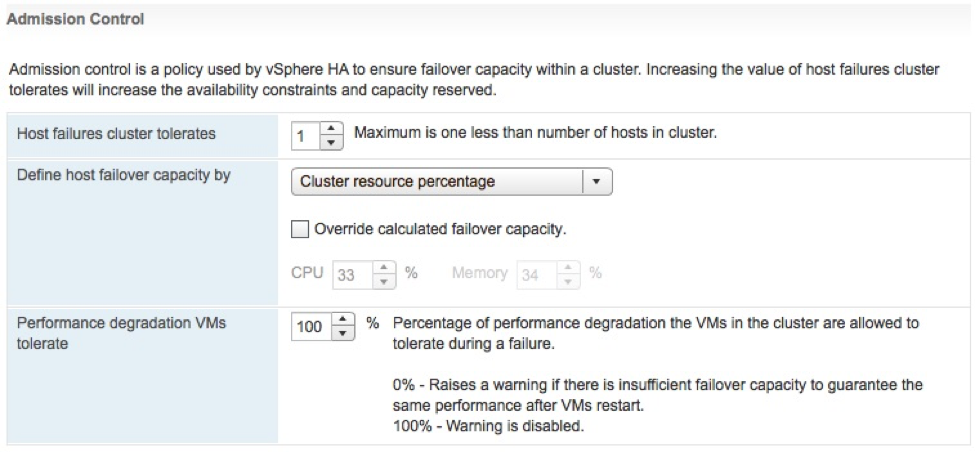
Several improvements have been made to vSphere HA Admission Control.  Admission control is used to set aside a calculated amount of resources that are used in the event of a host failure.  One of three different policies are used to enforce the amount of capacity is set aside.  Starting with vSphere 6.5, this configuration just got simpler.  The first major change is that the administrator simply needs to define the number of host failures to tolerate (FTT).  Once the numbers of hosts are configured, vSphere HA will automatically calculate a percentage of resources to set aside by applying the “Percentage of Cluster Resources” admission control policy.  As hosts are added or removed from the cluster, the percentage will be automatically recalculated.  This is the new default configuration, but it is possible to override the automatic calculation or use another admission control policy.
Additionally, the vSphere Web Client will issue a warning if vSphere HA detects a host failure would cause a reduction in VM performance based on the actual resource consumption, not only based on the configured reservations.  The administrator is able to configure how much of a performance loss is tolerated before a warning is issued.
admission-controlFault Tolerance (FT)

vSphere 6.5 FT has more integration with DRS which will help make better placement decisions by ranking the hosts based on the available network bandwidth as well as recommending which datastore to place the secondary vmdk files.
There has been a tremendous amount of effort to lower the network latency introduced with the new technology that powers vSphere FT. This will improve the performance to impact to certain types of applications that were sensitive to the additional latency first introduced with vSphere 6.0. This now opens the door for even a wider array of mission critical applications.
FT networks can now be configured to use multiple NICs to increase the overall bandwidth available for FT logging traffic.  This is a similar configuration to Multi-NIC vMotion to provide additional channels of communication for environments that required more bandwidth than a single NIC can provide.

DRS Advanced Options

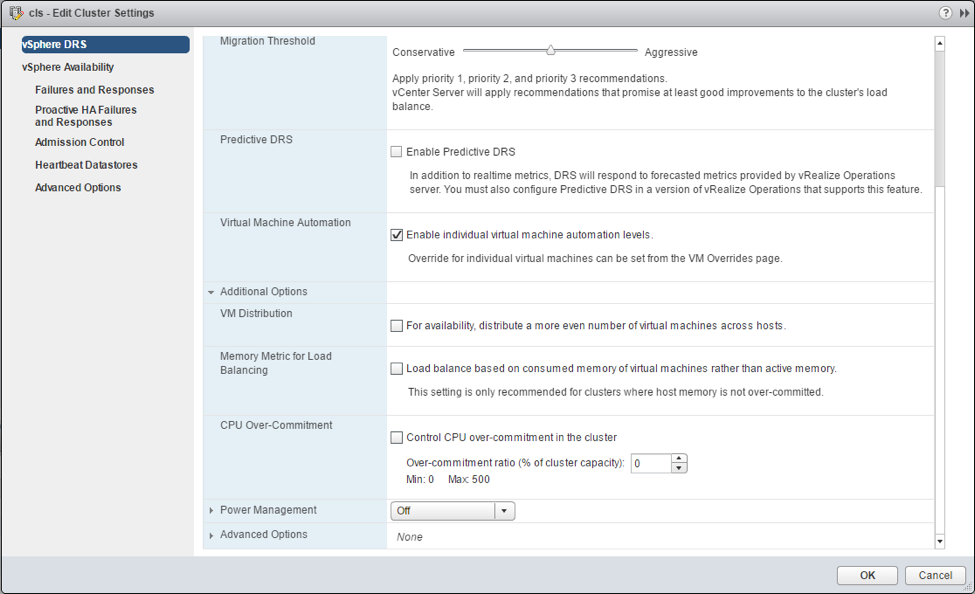
Three of the most common advanced options used in DRS clusters are now getting their own checkbox in the UI for simpler configuration.
  • VM Distribution: Enforce an even distribution of VMs. This will cause DRS to spread the count of the VMs evenly across the hosts.  This is to prevent too many eggs in one basket and minimizes the impact to the environment after encountering a host failure. If DRS detects a severe imbalance to the performance, it will correct the performance issue at the expense of the count being evenly distributed.
  • Memory Metric for Load Balancing: DRS uses Active memory + 25% as its primary metric when calculating memory load on a host. The Consumed memory vs active memory will cause DRS to use the consumed memory metric rather than Active.  This is beneficial when memory is not over-allocated.  As a side effect, the UI show the hosts be more balanced.
  • CPU over-commitment: This is an option to enforce a maximum vCPU:pCPU ratios in the cluster. Once the cluster reaches this defined value, no additional VMs will be allowed to power on.
drs-settingsNetwork-Aware DRS

DRS now considers network utilization, in addition to the 25+ metrics already used when making migration recommendations.  DRS observes the Tx and Rx rates of the connected physical uplinks and avoids placing VMs on hosts that are greater than 80% utilized. DRS will not reactively balance the hosts solely based on network utilization, rather, it will use network utilization as an additional check to determine whether the currently selected host is suitable for the VM. This additional input will improve DRS placement decisions, which results in better VM performance.

SIOC + SPBM

Storage IO Control configuration is now performed using Storage Policies and IO limits enforced using vSphere APIs for IO Filtering (VAIO). Using the Storage Based Policy Management (SPBM) framework, administrators can define different policies with different IO limits, and then assign VMs to those policies. This simplifies the ability to offer varying tiers of storage services and provides the ability to validate policy compliance.
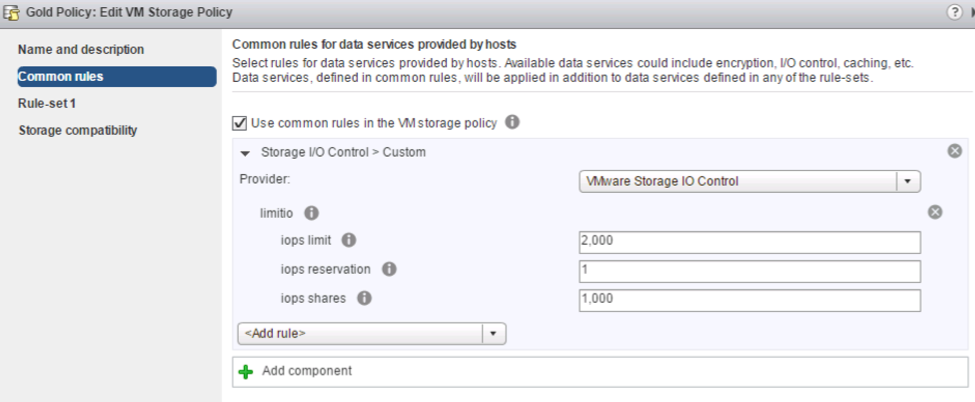
sioc-spbmContent Library

Content Library with vSphere 6.5 includes some very welcome usability improvements.  Administrators can now mount an ISO directly from the Content Library, apply a Guest OS Customization during VM deployment, and update existing templates.
Performance and recoverability has also been improved.  Scalability has been increased, and there is new option to control how a published library will store and sync content. When enabled, it will reduce the sync time between vCenter Servers are not using Enhanced Linked Mode.
The Content Library is now part of the vSphere 6.5 backup/restore service, and it is part of the VC HA feature set.

Developer and Automation Interfaces

The vSphere developer and automation interfaces are receiving some fantastic updates as well. Starting with the vSphere’s REST APIs, these have been extended to include VCSA and VM based management and configuration tasks. There’s also a new way to explore the available vSphere REST APIs with the API Explorer. The API Explorer is available locally on the vCenter server itself and will include information like what URL the API task is available to be called by, what method to use, what the request body should look like, and even a “Try It Out” button to perform the call live.
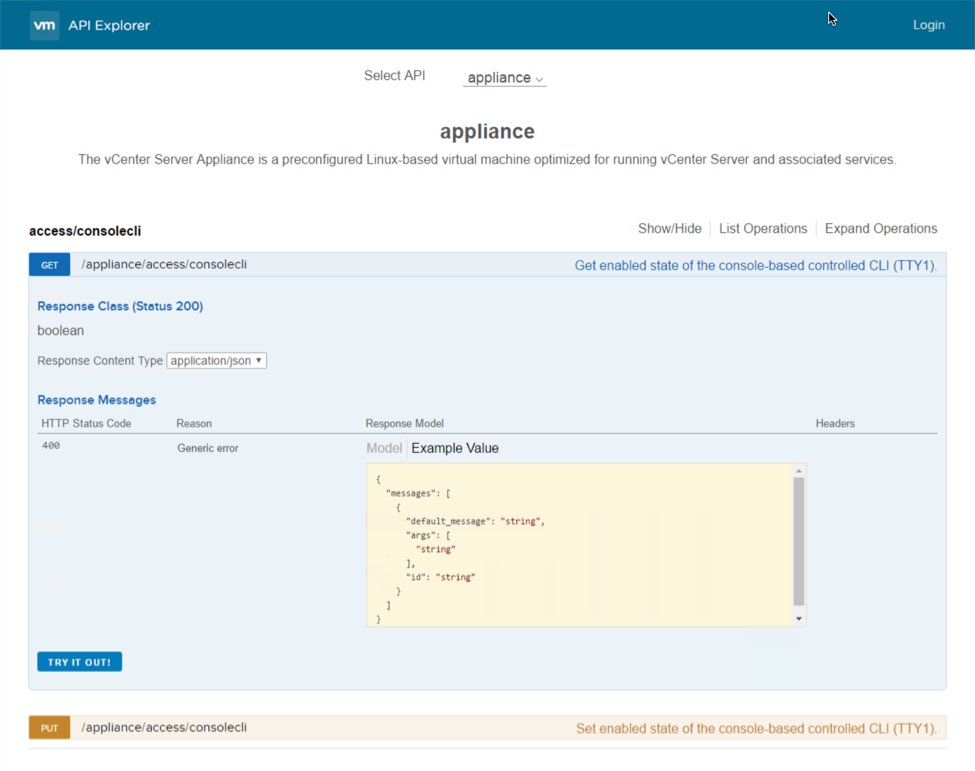
api-explorerMoving over to the CLIs, PowerCLI is now 100% module based! There’s also some key improvements to some of those modules as well. The Core module now supports cross vCenter vMotion by way of the Move-VM cmdlet. The VSAN module has been bolstered to feature 13 different cmdlets which focus on trying to automate the entire lifecycle of VSAN. The Horizon View module has been completely re-written and allows users to perform View related tasks from any system as well as the ability to interact with the View API.
The vSphere CLI (vCLI) also received some big updates. ESXCLI, which is installed as part of vCLI, now features several new storage based commands for handling VSAN core dump procedures, utilizing VSAN’s iSCSI functionality, managing NVMe devices, and other core storage commands. There’s also some additions on the network side to handle NIC based commands such as queuing, coalescing, and basic FCOE tasks. Lastly, the Datacenter CLI (DCLI), which is also installed as part of vCLI, can make use of all the new vSphere REST APIs!
Check out this example of the power of DCLI’s interactive mode with features like tab complete:
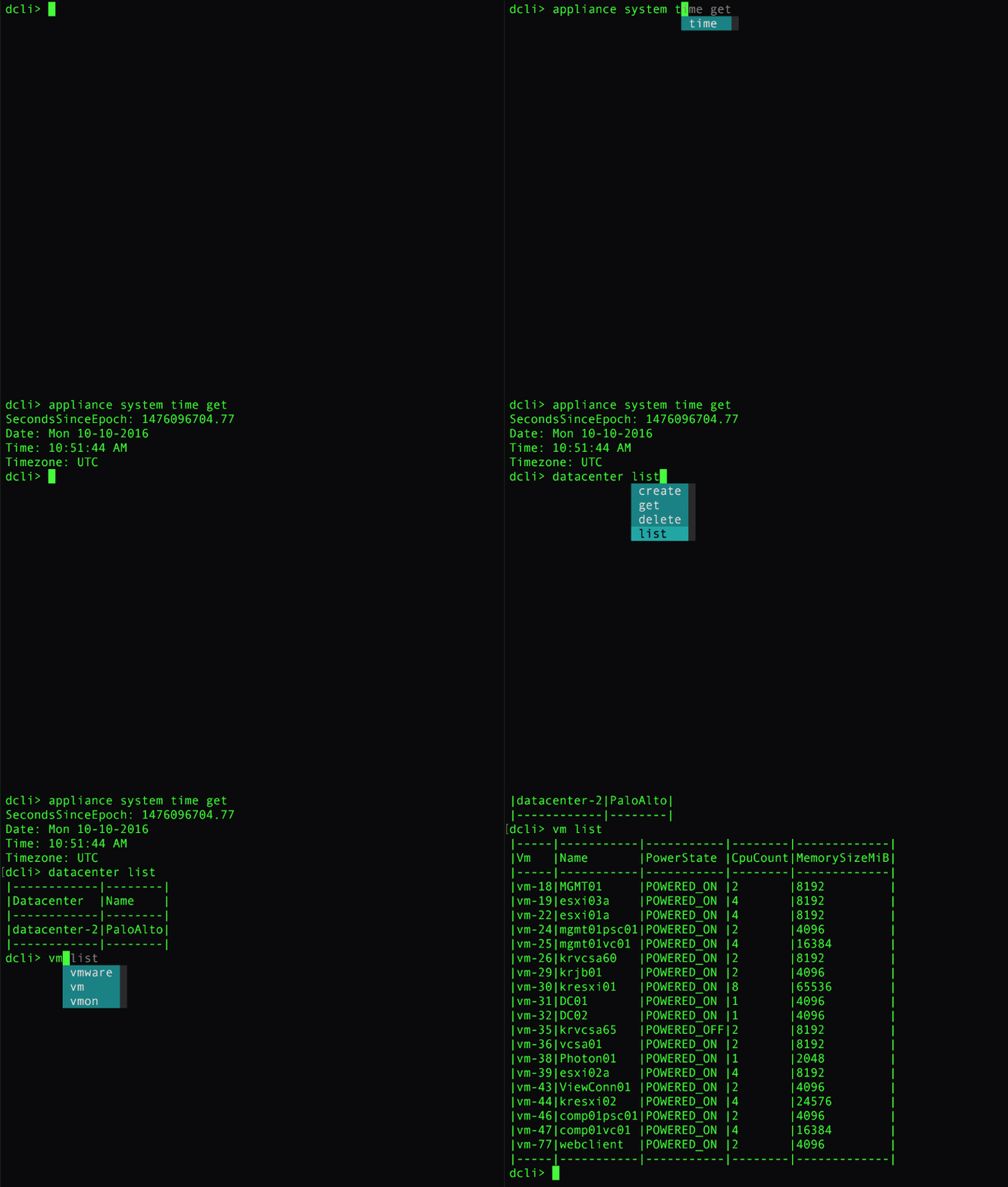
dcli

Operations Management

There’s been some exciting improvements on the vSphere with Operations Management (vSOM) side of the house as well. vRealize Operations Manager (vR Ops) has been updated to version 6.4 which include many new dashboards, dashboard improvements, and other key features to help administrators get to the root cause that much faster and more efficient. Log Insight for vCenter has been also updated, and will be on version 4.0. It contains a new user interface (UI) based on our new Clarity UI, increased API functionality around the installation process, the ability to perform automatic updates to agents, and some other general UI improvements. Also, both of these products will be compatible with vSphere 6.5 on day one.
Digging a little further into the vR Ops improvements, let’s first take a look at the three new dashboards titled: Operations Overview, Capacity Overview, and Troubleshoot a VM. The Operations dashboard will display pertinent environment based information such as an inventory summary, cluster update, overall alert volume, and some widgets containing Top-15 VMs experiencing CPU contention, memory contention, and disk latency. The Capacity dashboard contains information such as capacity totals as well as capacity in use across CPU count, RAM, and storage, reclaimable capacity, and a distributed utilization visualization. The Troubleshoot a VM dashboard is a nice central location to view individual VM based information like its alerts, relationships, and metrics based on demand, contention, parent cluster contention, and parent datastore latency.
vrops-dash
One other improvement that isn’t a dashboard but is a new view for each object, is the new resource details page. It closely resembles the Home dashboard that was added in a prior version, but only focuses on the object selected. Some of the information displayed is any active alerts, key properties, KPI metrics, and relational based information.
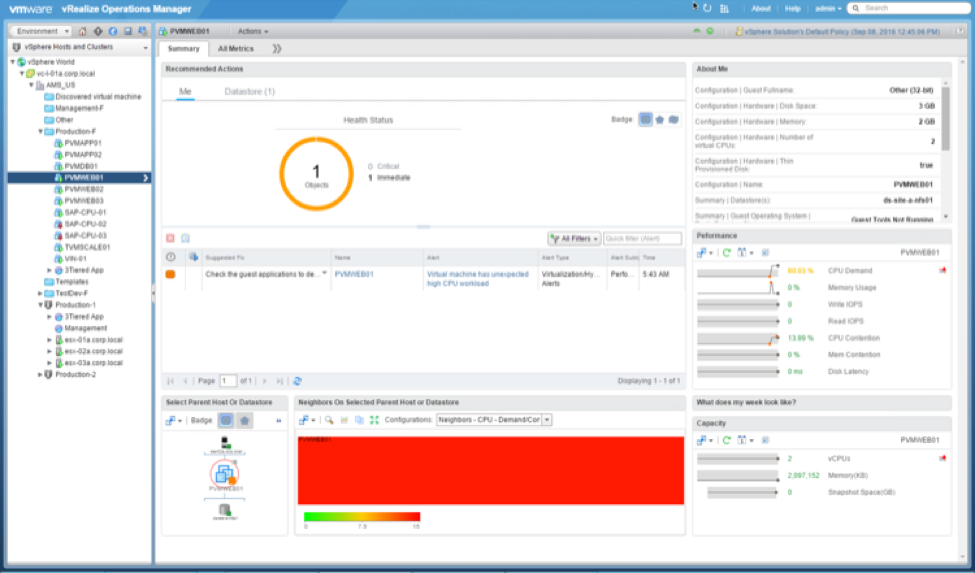
vrops-details
Covering some of the other notable improvements, there is now the ability to display the vSphere VM folders within vR Ops. There’s also the ability to group alerts so that it’s easy to see what the most prevalent alert might be. Alert groups also enable the functionality to clear alerts in a bulk fashion. Lastly, there are now KPI metric groups available out of the box to help easily chart out and correlate properties with a single click.

Source: What’s New in vSphere 6.5: Host & Resource Management and Operations


at January 19, 2017 No comments:
Email ThisBlogThis!Share to XShare to FacebookShare to Pinterest

Wednesday, September 2, 2015

New in vSphere 6.0 Update 1


New in vSphere 6.0 Update 1

Disclaimer - VMware has not relived official repeat notes. All info has been taken from VMWorld 2015 session INFO5060 What’s new with vSphere 

The upcoming release of vSphere 6.0 Update 1 in Q3 2015 contains several new features and improvements along with the requisite bug fixes that normally accompany VMware's Update structure. Here are some of the new capabilities for vSphere 6 U1.

vSphere vCenter Appliance

Easy install update and upgrade
  • vSphere update manager support in web client – The Update UI points to VMware’s online repository can also configure it to use an ISO or a existing repository (VUM will still require a separate Windows system)
  • Upgrading vSphere 6.0 VCSA to Update 1, can now be accomplished by an in-place upgrade or sometimes refer to as a build-2-build. Just mount the U1 ISO to your existing VCSA 6.0 appliance to perform the upgrade. 

Continued improvements in web client – performance and layout have been improved to more closely match the installable client.

Faster evacuation time for maintenance mode – Get those VMs moved in a hurry for a speedier evacuation to maintenance mode.

Certificate authority management - Simplified management in Web Client for certificate management, you won’t be forced to use the CLI to move certificates around.

Throughput enhancements vs using windows vCenter server – According to the presenter along with the VCSA supporting the same sizing scenarios as the Windows Server vCenter Install and improved throughput over Windows, U1 will boast another 20% increases in performance over the Windows install.

The VCSA now supports both vCenter Server as well as ESXi as a deployment targets. Pre U1 ESXi was the only available target.

The ability to convert a single server VCSA deployment to an external Platform Services Controller or PSC. This allows starting with a simple Embedded VCSA deployment and as they get comfortable with the VCSA and want to scale out to an External PSC you can, this allows you to use features like Enhanced Link Mode.

A new Platform Services Controller UI that uses the same backend as the PSC configurations found vCenter Web UI. This way provides the ability configure SSO when the Web Client is unavailable. Troubleshooting should get a lot simpler.


I will update this post as new information is reviled. 

at September 02, 2015 No comments:
Email ThisBlogThis!Share to XShare to FacebookShare to Pinterest

Tuesday, September 1, 2015

VMworld 2015 Anouncements


This year's VMworld doesn't seem as energetic as the last few years to me but one thing is for sure there 23000 people are here soak it all in. Most of the announcements so far are Cloud driven, a path that VMware has embraced strongly. here's the list sorry if I leave something out.

EVO SDDC Manager

EVO SDDC Manager is a single solution that contains the VMware vRealize Suite, NSX 6.2, VSAN 6.1 and vSphere 6. The solution is designed to be deployed in a two-hour timeframe and starts with just eight servers needed. Customers can grow their Software-defined Data Center a single host at a time after the initial deployment. The eight-host model supports 1,000 Infrastructure as a Service (IaaS) virtual machines (VMs), or 2,000 VDI VMs to start. EVO SDDC Manager supports the creation of a virtual rack design, known as a workload domain. Work domains provide ways of supporting non-disruptive lifecycle automation, such as patching workload domains through vMotion technology. Availability of EVO SDDC is expected in the first half of 2016

Hybrid Networking Services

VMware vCloud Air’s Hybrid Networking Services that combines intelligent routing, encryption, WAN acceleration, VXLAN extensions and direct connect capabilities from a VMware Private Cloud to vCloud Air. In the past, customers would use VMware vCloud Connector to migrate workloads from a VMware private cloud to vCloud Air using a copy process. This has been tightly integrated into vSphere using Content Libraries to allow administrators to synch VMs between private and public clouds. Now, however, we have Hybridity Actions available. Using a hybridity action from the vSphere Web Client, an application is no longer subject to a disruption when moving to vCloud Air under the vSphere replication process. Customers now have the choice to select either vSphere replication or the cross-cloud vMotion. This new announcement really excited the audience as VMware takes another step in the vMotion realm, by first moving vMotion into a long-distance vMotion process, and now onto cross-cloud.


vSphere Integrated Containers

The last major announcement from today’s keynote talks about vSphere Integrated Containers. This announcement is about how to build cloud-native applications that leverage both cloud infrastructure and frameworks within a distributed model. By using integrated containers, virtual admins can view and manage containers directly within the vSphere Web Client, while DevOps can continue to manage containers directly within the VM. From a security perspective, the integrated containers will also provide hardware-level isolation.


Im still working on more info and will continue to update this post as needed.
at September 01, 2015 No comments:
Email ThisBlogThis!Share to XShare to FacebookShare to Pinterest

Tuesday, April 21, 2015

Run Linux Containers on vSphere using Lightwave and Photon

It looks like the vsphere administrator that also support Linux containers may have gotten a little help thanks to two new open source projects.

For those of you that need a little intro into Linux Containers The Linux Containers (LXC) feature is a lightweight virtualization mechanism that does not require you to set up a virtual machine on an emulation of physical hardware. The Linux Container allows you to run a single application within a container (an application container) whose name space is isolated from the other processes on the system in a similar manner to a chroot jail. Making running many copies of application configurations on the same system a viable option over lots of VMs running on a host.
An example configuration would be a LAMP stack, which combines Linux, Apache server, MySQL, and Perl, PHP, or Python scripts to provide specialised web services.

If you are still with me let's take a look at project Photon and project Lightwave.

From the VMWare blog

Two open source projects were just announced by the Cloud-Native Apps group: Project Photon and Project Lightwave. Both of these projects will be foundational elements for running Linux containers and supporting next-generation application architectures. This marked a big milestone in the lifecycle of VMware Cloud-Native Apps, and at first glance may seem to be a lot more relevant to application developers than the traditional vSphere audience, but there really is a great tie-in to the Software-Defined Data Center. 

From the project Photon site

We recognized the need to expand our customers’ capabilities for developing and running cloud-native apps. Our customers let us know they wanted to take advantage of new technologies such as containers that allow them to easily package their applications as well as scale them in real-time, so we aimed to provide easy portability of containerized applications between on-prem and public cloud. We knew that our customers needed an environment that provided consistency from development through production, to smooth integration and deployment and speed time to market. To address these challenges, we have introduced Project Photon, a lightweight Linux operating system for cloud-native apps. Photon is optimized for vSphere and vCloud Air, providing an easy way for our customers to extend their current platform with VMware and run modern, distributed applications using containers. Photon provides the following benefits: Support for the most popular Linux container formats including Docker, rkt, and Garden from Pivotal Minimal footprint (approximately 300MB), to provide an efficient environment for running containers Seamless migration of container workloads from development to production All the security, management, and orchestration benefits already provided with vSphere offering system administrators with operational simplicity.

From the Lighwave site
Lightwave is an open source project comprised of standards-based, enterprise-grade, identity and access management services targeting critical security, governance, and compliance challenges for cloud-native apps. The project’s code is tested and production-ready having been used in VMware’s solutions to secure distributed environments at scale. Here are a few of its features: Multi-tenancy to simplify governance and compliance across the infrastructure and application stack and across all stages of application development lifecycle Support for SASL, OAuth, SAML, LDAP v3, Kerberos, X.509, and WS-Trust Extensible authentication and authorization using username and password, tokens and PKI infrastructure for users, computers, containers and user defined objects Project Lightwave pairs well with Project Photon (which we also announced today), our lightweight Linux OS optimized for cloud-native applications, to provide an enforcement layer for identity and access management via VMware vSphere and vCloud Air

So it looks like there may be a fairly simply way to move over to a VMware based Linux Container infrastructure with enterprise level security and backing. These projects could very well change the standard enterprise model for public and private cloud application hosting.
at April 21, 2015 3 comments:
Email ThisBlogThis!Share to XShare to FacebookShare to Pinterest

Friday, February 27, 2015

vSphere 6 - The next Generation

Go ahead cringe at the title. Feel better now?

OK so this month VMware announced vSphere 6, looks like a lot has changed. Here is the breakdown

From the VMware Press release

"VMware vSphere® 6, the newest edition of the industry-defining virtualization solution for the hybrid cloud and foundation for the software-defined data center. With more than 650 new features and innovations, VMware vSphere 6 will provide customers with a highly available, resilient, on-demand cloud infrastructure to run, protect and manage any application. VMware vSphere 6 will be complemented by the newest releases of VMware vCloud® Suite 6, VMware vSphere with Operations Management™ 6, and VMware Virtual SAN™ 6."

 Seems like a big deal right? Ill break down a little bit of what matters to us, the engineers:


What’s New in VMware vSphere 6.0?
Compute

  • Increased Scalability – Increased configuration maximums: Virtual machines will support up to 128 virtual CPUs (vCPUs) and 4TB virtual RAM (vRAM). Hosts will support up to 480 CPU and 12TB of RAM, 2,048 virtual machines per host, and 64 nodes per cluster.
  • Instant Clone – Technology, built in vSphere 6.0, that lays that foundation to rapidly clone and deploy virtual machines, as much as 10x faster than what is currently possible today. 
Storage
  • Transform Storage for your Virtual Machines – vSphere Virtual Volumes* enables your external storage arrays to become VM-aware. Storage Policy-Based Management (SPBM) allows common management across storage tiers and dynamic storage class of service automation. Together they enable exact combinations of data services (such as clones snapshots) to be instantiated more efficiently on a per VM basis. 
Network


  • Network IO Control – New support for per-VM Distributed vSwitch bandwidth reservations to guarantee isolation and enforce limits on bandwidth. 
  • Multicast Snooping - Supports IGMP snooping for IPv4 packet and MLD snooping for IPv6 packets in VDS. Improves performance and scale with multicast traffic.
  • Multiple TCP/IP stack for vMotion - Allows vMotion traffic a dedicated networking stack. Simplifies IP address management with a dedicated default gateway for vMotion traffic.
Availability
  • vMotion Enhancements – Perform non-disruptive live migration of workloads across distributed switches and vCenter Servers and over distances of up to 100ms RTT. The astonishing 10x increase in RTT offered in long-distance vMotion now makes it possible for data centers physically located in New York and London to migrate live workloads between one another.
  • Replication-Assisted vMotion – Enables customers, with active-active replication set up between two sites, to perform a more efficient vMotion resulting in huge time and resource savings – as much as 95 percent more efficient depending on the size of the data.
  • Fault Tolerance (up to 4-vCPUs) – Expanded support for software based fault tolerance for workloads with up to 4 virtual CPUs.

Management

  • Content Library – Centralized repository that provides simple and effective management for content including virtual machine templates, ISO images and scripts. With vSphere Content Library, it is now possible to store and manage content from a central location and share through a publish/subscribe model.
  • Cross-vCenter Clone and Migration – Copy and move virtual machines between hosts on different vCenter Servers in a single action.
  • Enhanced User Interface – Web Client is more responsive, more intuitive, and more streamlined than ever before.

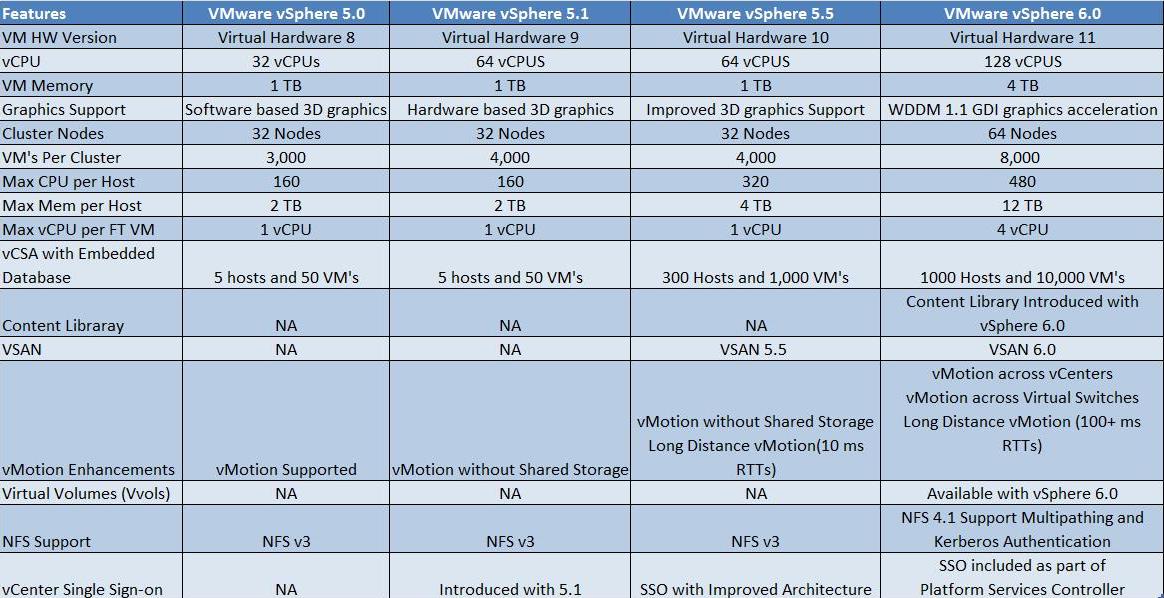
So how does vSphere 6 compare with previous versions? Its Different to say the least (feature set)

*Image from vmwarearena.com

Configuration maximums were increased. Quite a big difference.

*Image from blogs.vmware.com

Also New!

vSphere Content Library provides a centralized repository that provides simple and effective management for content including VM templates, ISO images, and scripts.  With Content Library, it is now possible to store and manage content from a central location and share through a publish/subscribe model.

Support for OpenStack clouds with the release of VMware Integrated OpenStack (VIO). VIO has made vSphere not only compatible, but optimized for OpenStack through many core integrations.  VMware Integrated OpenStack is an add-on package.


at February 27, 2015 No comments:
Email ThisBlogThis!Share to XShare to FacebookShare to Pinterest

Just Passed the VCP550D

I took the VMWare VCP550D delta exam to day since my VCP5 was going to expire in March 15th 2015. The test cost $120 and is 65 questions long with a 75 minute time limit. their isnt a lot of time and as a matter of fact I failed the test the first tie due ti running out of time. this time I passed with a score of 500.


I used the following resources to pass this test:

  • The VMware mylearn website 
  • The exam blueprints
  • This Whats New video
All the documentation needed is in the blueprint. Some of the questions I had to think on consisted of vSphere Editions, vCOPs (badges and what elements make them up) and Distributed Switches. the wording on those questions seems like it's meant to throw you off, read them slowly. there are also questions for  vSAN, VDP, and Replication, along with the standard VCP questions.

If you qualify for the test take it soon before time runs out.
at February 27, 2015 No comments:
Email ThisBlogThis!Share to XShare to FacebookShare to Pinterest

Thursday, February 12, 2015

2015 vExpert!

Well it finally happened I was granted the honorary title of vExpert. this has motivated me to kick up the blogging. Look forward to more post from me in the future.

I wan to cover some of the following but am also taking request.
vSphere 6
Horizon 6
Nutanix NOS 4.1
and more randomness

I really want to thank the VMWare vExpert selection pannel for selecting me for 2015

 
at February 12, 2015 No comments:
Email ThisBlogThis!Share to XShare to FacebookShare to Pinterest
Newer Posts Older Posts Home
Subscribe to: Comments (Atom)

VeeamON 2017 Announcements

VeeamOn 2017 has turned out to be pretty good. There were lots of updates from Veeam and partners that should keep me busy for quite awhile...

  • Datastore size and VMs per datastore. A look at Disk Queue limits affect on sizing.
    As a consultant I get all kinds of questions but two of the most commonly asked is; "What size do we need to make these datastores?...
  • VeeamON 2017 Announcements
    VeeamOn 2017 has turned out to be pretty good. There were lots of updates from Veeam and partners that should keep me busy for quite awhile...
  • Run Linux Containers on vSphere using Lightwave and Photon
    It looks like the vsphere administrator that also support Linux containers may have gotten a little help thanks to two new open source proje...

Search This Blog

  • Home

About Me

Unknown
View my complete profile

vExpert

vExpert

Translate

Blog Archive

  • ▼  2017 (3)
    • ▼  May (1)
      • VeeamON 2017 Announcements
    • ►  March (1)
    • ►  January (1)
  • ►  2015 (6)
    • ►  September (2)
    • ►  April (1)
    • ►  February (3)
  • ►  2014 (2)
    • ►  July (1)
    • ►  April (1)
  • ►  2013 (2)
    • ►  November (1)
    • ►  October (1)

Report Abuse

top navigation

About me

recent posts

Sponsor

footer social

Facebook

Picture Window theme. Powered by Blogger.